Search This Blog

Showing posts with label command line. Show all posts

2013-12-10

Change TTYs In Linux To Debug

I have found this useful while doing a kickstart install. Being able to change your terminal when an irrecoverable error shows up is very useful.

The way to get to other terminal types is to use a combination of: Ctrl+Alt+F-key

Here's the functions of some of them:
Ctrl+Alt-F1 - The installation dialog when using text or cmdline 
Ctrl+Alt-F2 - A shell prompt
Ctrl+Alt-F3 - The install log displaying messages from install program
Ctrl+Alt-F4 - The system log displaying messages from kernel, etc.
Ctrl+Alt-F5 - All other messages 
Ctrl+Alt-F7 - The installation dialog when using the graphical installer 

2011-04-28

Right Click to Open a Folder in Command Prompt


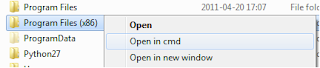
If you need to open a command prompt to a folder, you can add a right click option explorer. This lets you quickly open a a command prompt in the folder you choose, having to avoid typing CD and the path to the folder.

  1. Start > Run > regedit
  2. Navigate to "HKEY_LOCAL_MACHINE/Software/Classes/Folder/Shell"
  3. Create new KEY called "Command Prompt"
  4. Change the default string to "Open in cmd"
  5. Create a new KEY called "command"
  6. Change the default string to "cmd.exe /k pushd %1"
You can change "Open in CMD" to anything you want to show up on the right click menu.

Now, when you right click on (not in) a folder in Explorer, a new option will be available to open the folder in command prompt.

2011-02-23

DNS, DHCP and Static IP with Ubuntu

I finished setting up an Ubuntu server a test lab, and quickly learned a few tips for DHCP and static IP addresses.

Setting and Interface for DHCP

If you want to change an interface to use DHCP, edit /etc/network/interfaces making sure you remove the static config

Example:
nano /etc/network/interfaces

iface eth0 inet static
address 192.168.0.x
netmask 255.255.255.0
network 192.168.0.x
broadcast 192.168.0.255
gateway 192.168.0.x

to

iface eth0 inet dhcp

The reverse can be done to change from DHCP to static.

Adding Alternative DNS server

Since DNS servers are handled by the DHCP, I wanted to add an alternative DNS server. Editting the dhclient.conf lets you do this and adding the following the lines to the file.

Example:
nano /etc/dhcp3/dhclient.conf

prepend domain-name-servers 127.0.0.1

or use supersede to replace them.

supersede domain-name-servers 127.0.0.1

Now the your Ubuntu server can run with DHCP with alternative DNS servers.

Use /etc/init.d/networking restart to apply the changes for the DHCP and DNS right away.

2010-12-20

Patching ESXi single host

For ESXi 4.0 and below, patching can be done with vSphere Host Update Utility.

For ESXi 4.1, vSphere Host Update Utility is no longer supported. Patch using command line:

1) Download patch bundles from VMware's support website: www.vmware.com/patch/download/

2) Upload the patch bundles to your datastore. (You can use vSphere client to do this.)

3) Put the ESXi host into maintenance mode.

4) SSH into the ESXi box. This blog shows how to enable SSH on ESXi 4.1.

5) CD to the datastore and use esxupdate --bundle to patch ESXi:
cd /vmfs/volumes/datastore0/patches
esxupdate --bundle ./ESXi410-201011001.zip update